How to integrate AI code review into GitHub Actions without flooding your team
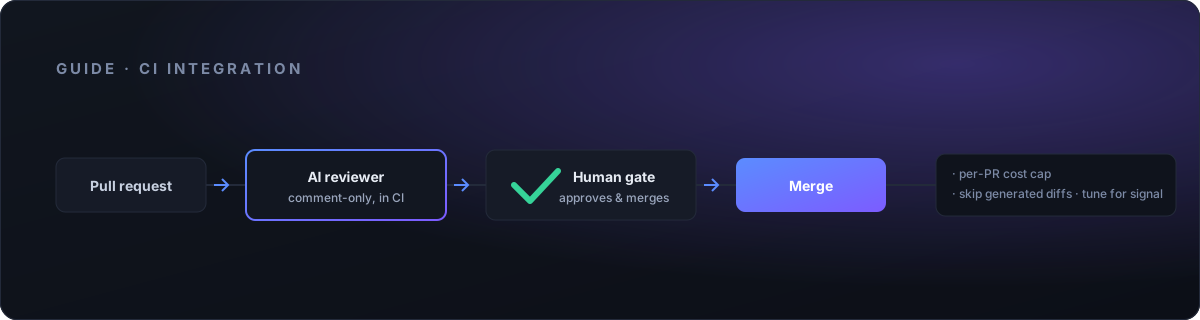
Adding an AI reviewer to your pipeline takes about an hour. Adding one your team doesn't mute within two weeks takes a little more thought. The difference is not the tool — it's how you wire it in.
This guide covers the operational how: the four parts of a working setup, where each lives in GitHub Actions, how to cap what it costs, and how to tune it so the comments are worth reading. It stays tool-agnostic. Whether you land on CodeRabbit, Qodo, or something else, the shape is the same.
The four parts of a working setup
A production-grade integration has four moving parts. Skip any one and you get the version people complain about.
- The reviewer running in CI on real PRs. Not a demo repo, not a one-off. It sees every pull request the way a human reviewer would.
- A human-approval gate. Nobody merges on the AI's say-so. Early on, the AI never has merge or write permission at all — it comments, a person decides.
- A metered cost cap. A hard ceiling per PR and sensible skips, so a 4,000-file generated diff doesn't quietly burn your budget.
- Visibility. You can see how often it fires, how often it's right, and whether the team is acting on it or scrolling past.
Each of these maps to a concrete place in your GitHub setup. For the reasoning behind why all four matter, see the four parts in depth.
Where each part lives in GitHub Actions
The trigger. The reviewer runs on the pull_request event, typically on opened and synchronize so it re-reviews when new commits land. That's the whole entry point. You do not want it on push to every branch — that reviews work-in-progress nobody asked about and multiplies cost.
How it runs. Two common shapes. Either you install the vendor's GitHub App, which reacts to PRs on its own, or you run the reviewer as a step inside a workflow you control. The App route is faster to stand up; the workflow route gives you tighter control over permissions, cost caps, and which diffs get skipped. For a team that cares about running in its own environment, the workflow step is usually the better fit.
Keep it comment-only. This is the single most important configuration choice. The reviewer posts review comments and nothing else. In a GitHub Actions workflow, that means scoping the job's token so it can read the PR and write comments, but cannot push, merge, or change branch protection. Concretely:
- Give the job the minimum token permissions it needs — read access to contents, write access to pull requests for posting comments. Nothing else.
- Do not grant it merge rights. The gate is enforced by GitHub, not by trusting the bot to behave.
- Exact permission keys vary by tool and by whether you use the App or a workflow step — check your tool's docs for the specific scopes.
Gate the merge behind humans. Turn on branch protection on your default branch: require at least one human approving review before merge. The AI's comments inform that human; they never replace the approval. This is the assistive principle in one line of config — a person approves every action that changes the codebase.
Secrets and permissions
The reviewer needs an API key or vendor token. Store it as an encrypted repository or organization secret in GitHub Actions and reference it from the workflow — never inline it, never commit it. A few habits that save pain later:
- Keep the model or vendor key in Actions secrets, scoped to the repos that use it.
- Prefer the built-in
GITHUB_TOKENwith narrowed permissions over a long-lived personal access token where the tool supports it. - If you self-host any part, keep the key in your own secret store and pass it in at run time, so review data and credentials stay inside your environment.
How to cap cost
Cost problems come from volume and from pathological diffs, so cap both.
- Set a per-PR ceiling. Most tools let you bound tokens or files per review. Set it. It converts a scary open-ended bill into a predictable per-PR number.
- Skip huge and generated diffs. Lockfiles, generated clients, vendored dependencies, migrations, minified assets — none of these benefit from AI review and all of them are expensive. Exclude them.
- Use path filters. Point the reviewer at the code that matters — application source, not
dist/,node_modules/, or snapshot fixtures. In Actions you can filter at the workflow level with path filters, and again inside the tool's own ignore config. Do both.
The mechanics differ per tool — some read a config file in the repo, some use dashboard settings — so check your tool's docs for exact keys. The principle is constant: review less, review the right things.
Tune for signal, or the team mutes it
An AI reviewer that comments on everything gets treated like a linter nobody configured — collapsed, ignored, muted. Once that happens it's dead weight even when it's right. That failure mode is common enough that it has its own writeup: why teams mute AI code review.
To stay on the useful side:
- Start strict. Bias toward precision over recall. A reviewer that says less but is right earns trust; one that's noisy loses it in a week, and trust doesn't come back easily.
- Curate the rules. Turn off whole categories that duplicate your existing linters or formatters. Let the AI do what static tools can't — logic errors, regressions, subtle contract breaks.
- Feed it repo context. Point it at your conventions, your architecture notes, your definitions of "our way." Context is the difference between generic advice and a comment that actually fits your codebase.
The bar to aim for: the reviewer should catch the real regressions and stay quiet on correct changes. In a blind test on the excalidraw codebase, a well-tuned setup caught 2 of 2 merged-then-reverted regressions and stayed silent on 1 of 1 correct change. That silence on the good change is the point — quiet-when-right is what keeps the team reading the comments.
A rollout sequence that works
Don't flip it on across every repo on day one.
- Pilot on recent PRs. Run the reviewer against your last few weeks of merged PRs, offline, and read what it would have said. This tells you the true signal-to-noise on your actual code before anyone is exposed to it.
- Turn it on for one repo, comment-only. No merge gating changes yet. Watch how the team reacts for a week.
- Tune from real reactions. Silence the categories people ignore. Keep what they thumbs-up.
- Add the merge gate and expand. Once the signal is good and branch protection is in place, roll to the next repo.
Picking the right tool for the pilot is its own decision — how to evaluate AI QA tools walks through it.
Get it wired in
Most teams can stand up the naive version themselves. The hour that matters is the tuning — the ceilings, the skips, the curated rules, the pilot on your real PRs — because that's what decides whether the team keeps it or mutes it.
That's the work we do. We wire AI code review into your repo in a scoped pilot, run entirely in your environment with a human approving every action, and hand it over tuned for signal. Start a pilot.